
AI at the Command Line

Exploring Real-Time Cybersecurity Solutions

AI-Driven Threat Detection

At some point, I needed to call Chatgpt and other Generative AI using command line, i knew that API is one option, however there are already free tools that can query multiple AI provider and display the output directly in your bash/zsh for Linux/Unix or MacOS, for windows you need to enable wsl ( Windows subsystem for Linux ) and install Ubuntu .

What is Fabric?

Fabric is an open-source framework, created to enable users to granularly apply AI to everyday challenges.

Daniel Miessle

I created it to enable humans to easily augment themselves with AI. I believe it’s currently too difficult for people to use AI. I think there are too many tools, too many websites, and too few practical use cases that combine a problem with a solution. Fabric is a way of addressing those problems.

Daniel Miessle
The creator of Fabric
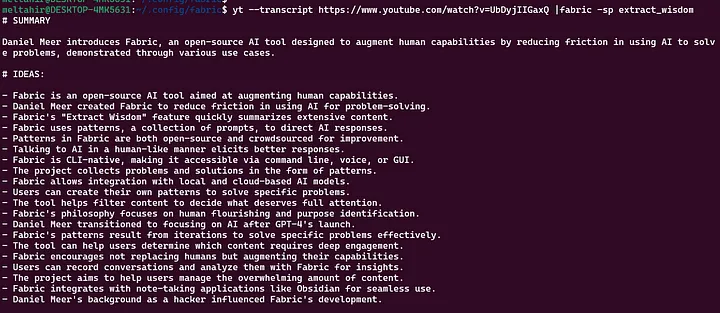
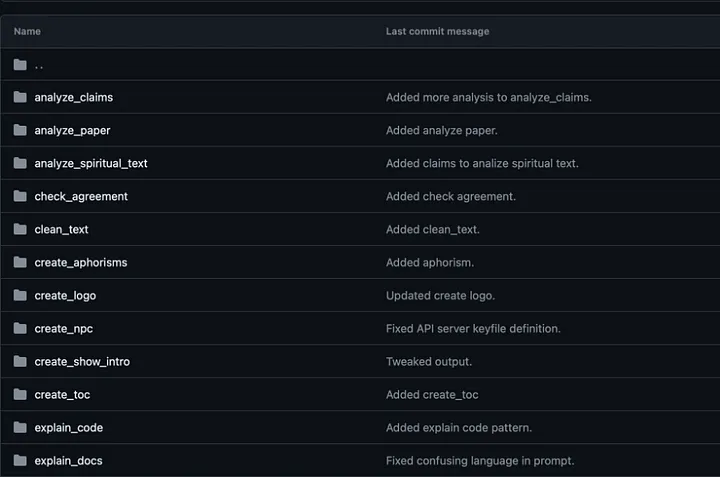
Fabric has Patterns for all sorts of life and work activities, including:

  • Extracting the most interesting parts of YouTube videos and podcasts
  • Writing an essay in your voice with just an idea as input
  • Summarizing opaque academic papers
  • Creating perfectly matched AI art prompts for a piece of writing
  • Rating the quality of content to see if you want to read/watch the whole thing
  • Getting summaries of long, boring content
  • Explaining code
  • Turning bad documentation into usable documentation
  • Create social media posts from any content input

Setting up the fabric commands

# Clone Fabric to your computer
git clone https://github.com/danielmiessler/fabric.git

Enter the main Directory

# Enter the project folder (where you cloned it)

$ cd fabric

Install pipx

if you are using MacOS

$ brew install pipx

For Linux use:

$ sudo apt install pipx

Windows:

Use WSL and follow the Linux instructions.

c:\Users\new>  wsl.exe –install Ubuntu

$ sudo apt install pipx

To ensure your path

# For bash ( Linux & wsl linux )
pipx ensurepath
source ~/.bashrc

# for zsh (MacOS)
source ~/.zsh

Next setup and configure fabric

$ fabric –setup

You need to export your Chatgpt API Key

$ export OPENAI_API_KEY=“XXXXXX”

Also you need to export Youtube API Key, to create Youtube API key you have login to https://console.cloud.google.com/ and create project first and then create Api key, please check the following video

Note that API keys exist in folder ~/.config/fabric/.env

$ export YOUTUBE_API_KEY=XXXXXXX

You can test now searching for text like “Best Movie in 2021”

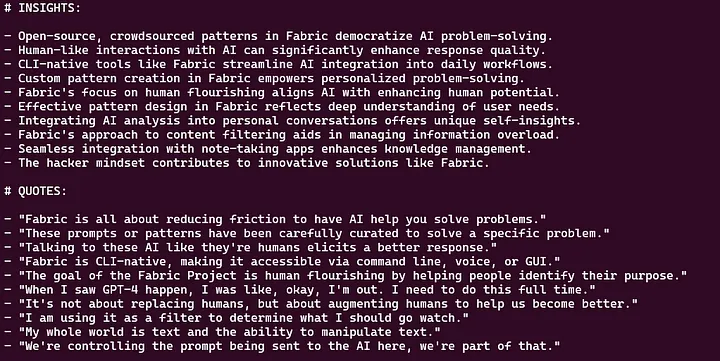
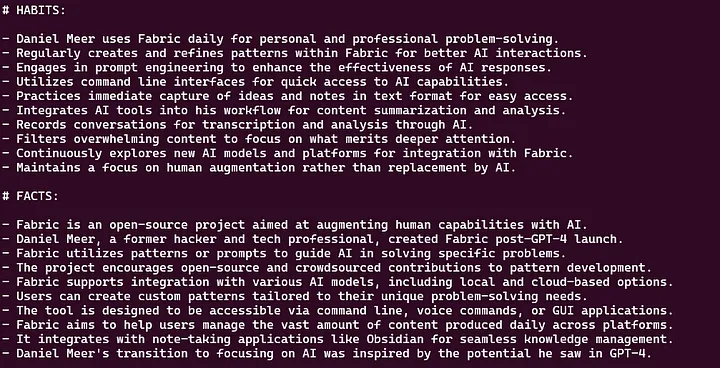
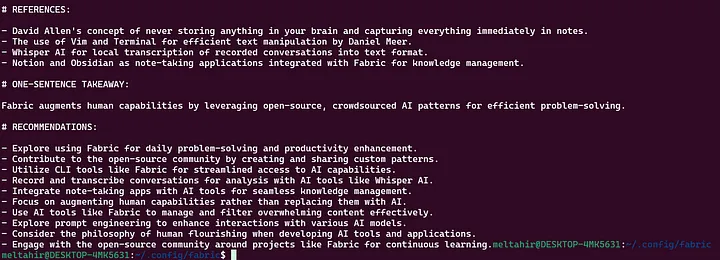
$ echo “best movie 2023”|fabric –pattern summarize

If you want to summerize video on Youtube, you can do;

The Above video is for Network chuck who was talking about the same tool and the result of this command is awsome

The client, by default, runs Fabric patterns without needing a server (the Patterns were downloaded during setup). This means the client connects directly to OpenAI using the input given and the Fabric pattern used.

You can set pbpaste (ordinally from MarOS) , in linux like this :

$ # Linux version of OSX pbcopy and pbpaste.

alias pbcopy=’xsel — clipboard — input’
alias pbpaste=’xsel — clipboard — output’

pbpaste | fabric –pattern summarize

Run the analyze_claims Pattern with the --stream option to get immediate and streaming results.

$ pbpaste|fabric –stream –pattern analyze_claims

Here are some of the pattern as documented by Author

save is a “tee-like” utility to pipeline saving of content, while keeping the output stream intact. Can optionally generate “frontmatter” for PKM utilities like Obsidian via the “FABRIC_FRONTMATTER” environment variable

If you’d like to default variables, set them in ~/.config/fabric/.envFABRIC_OUTPUT_PATH needs to be set so save where to write. FABRIC_FRONTMATTER_TAGS is optional, but useful for tracking how tags have entered your PKM, if that’s important to you.

$ echo test | save –tag extra-tag stub-for-name

Conclusion

fabric is an open-source framework for augmenting humans using AI. It provides a modular framework for solving specific problems using a crowdsourced set of AI prompts that can be used anywhere.

Sign up for newsletter

Subscribe to the newsletter for all the latest updates

Root Cybers

Root Cybers as a provider specializing in advanced cybersecurity solutions and AI-driven technologies, ensuring comprehensive protection and innovative insights for your digital assets

Scroll to Top